Grid Billing
Introduction
In this section, we explain how the billing works on the TFGrid by showing different examples such as node, rent and name contracts as well as public IP and network usage.
Note: Values on chain are expressed as units USD per hour, where 1 unit USD = 10.000.000 (or 1e7). To get the amount in TFT, simply divide the amount by 10^7.
Resources to Update
Some of the used resources should be updated whenever you try to do these calculations, these resources are the TFT price and the cloud units (SU and CU).
Current TFT Price
TFT price can be retrieved directly through Stellar or from the Dashboard, through the price available in the header.
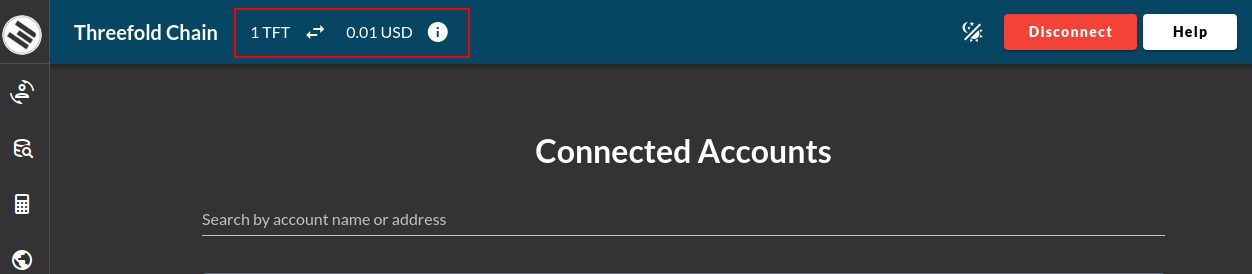
TFT Billing Price on TFChain
The TFT price used for on-chain billing is not the raw market price. Instead, TFChain applies a billing price: the market-derived average price clamped within council-defined minimum and maximum bounds. This prevents extreme market volatility from causing unpredictable costs for users or unfair compensation for farmers.
Market Price vs Billing Price
TFT has two distinct prices, each used for a different purpose:
- Market price: The real trading value of TFT on exchanges. Used for buying, selling, swapping, and displaying TFT value in fiat.
- Billing price: The value of TFT used internally by TFChain to calculate resource costs and contract billing. Derived from the market price but clamped to council-defined bounds.
Why This Matters
The clamping mechanism protects both users and farmers from extreme market swings. Consider a workload that costs 100 mUSD/hour:
When market price is below the floor (protects users):
- Market price = 5 mUSD per TFT, but the floor is 10 mUSD
- Billing price becomes 10 mUSD per TFT
- On-chain cost:
100 / 10 = 10 TFT/hourinstead of100 / 5 = 20 TFT/hour - The user pays fewer TFT than the market price would suggest
When market price is above the ceiling (protects farmers):
- Market price = 1500 mUSD per TFT, but the ceiling is 1000 mUSD
- Billing price becomes 1000 mUSD per TFT
- On-chain cost:
100 / 1000 = 0.1 TFT/hourinstead of100 / 1500 = 0.067 TFT/hour - The farmer receives more TFT than the market price would suggest
Grid tooling (e.g. the grid client and calculator) has been updated to use the billing price for cost estimations, matching the actual on-chain billing logic.
How It Works
Three values stored on TFChain govern this mechanism. All values are expressed in mUSD (millionths of USD):
| Parameter | Description | Current Value |
|---|---|---|
MinTftPrice | Floor billing price | 10 mUSD (0.01 USD) |
MaxTftPrice | Ceiling billing price | 1000 mUSD (1.00 USD) |
AverageTftPrice | Market-derived average price | Varies |
The billing price is calculated by clamping the average market price to the configured bounds:
BillingPrice = max(MinTftPrice, min(AverageTftPrice, MaxTftPrice))
- If the market price drops below
MinTftPrice, the billing price uses the minimum (floor). - If the market price rises above
MaxTftPrice, the billing price uses the maximum (ceiling). - Otherwise, the actual average market price is used as-is.
Querying the Current Values
These values can be queried from TFChain using the Polkadot UI:
- Go to the Chain State page
- Select
tftPriceModuleas the selected state query - Query
minTftPrice,maxTftPrice, andaverageTftPriceto see the current on-chain values
Note: The min and max bounds are set by the TFChain council and can be updated through governance. Always query the current values rather than relying on the defaults listed above.
Current Cloud Units Values
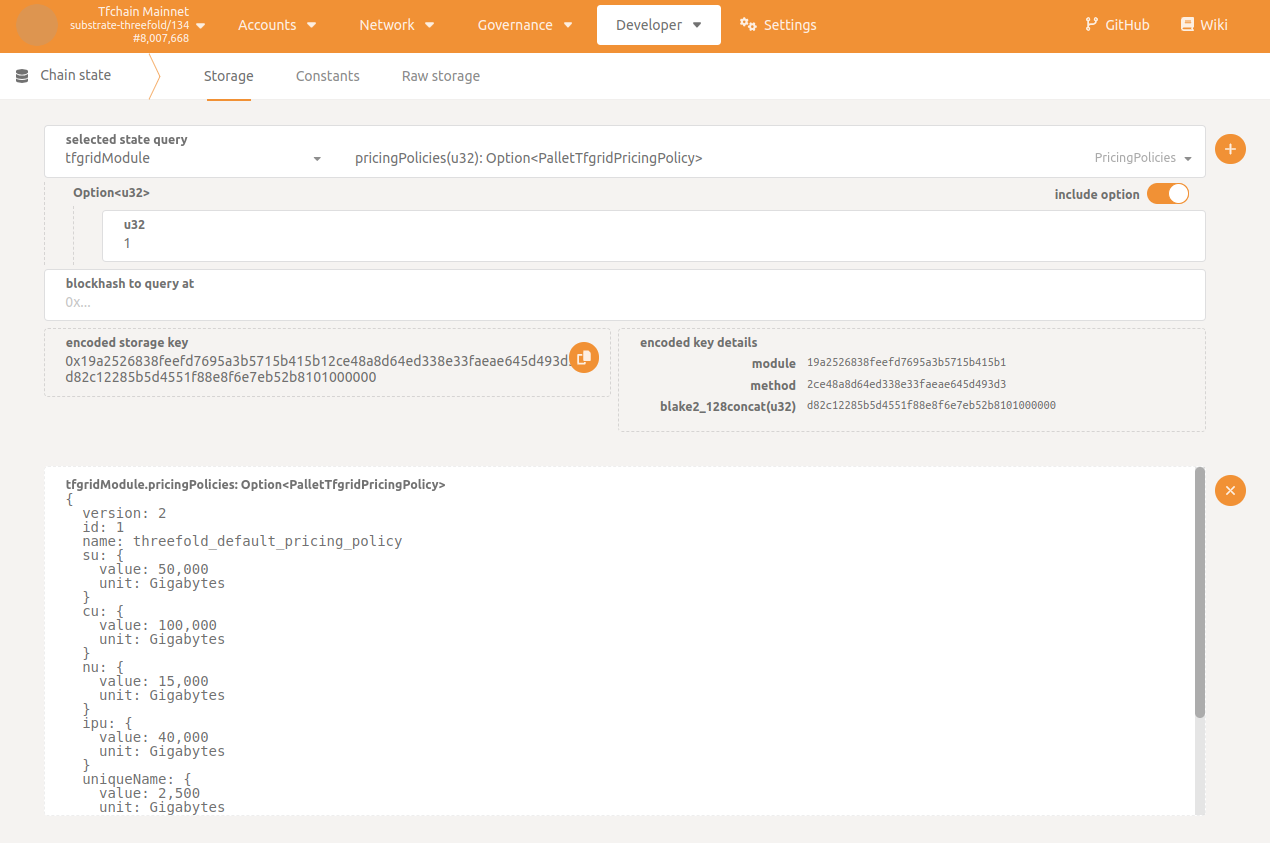
The current cloud units values can be retrieved directly from TChain with the Polkadot UI and the current chain state.
- On the page
Chain State, selecttfgridModuleas theselected state query - Select
pricingPolicies(u32): Option<PalletTfgridPricingPolicy> - Enter the value of the default pricing policy, which is
1, or enter the value of any other policy if you need to use a custom one - Press
Enter
Node Contract
For this example, we will assume that the resources for this deployment are the following:
CRU: 2
MRU: 2
SRU: 15
HRU: 0
Calculating the CU
Let's calculate the CU of this deployment.
For our example, the CU value is 10 mUSD/h. Make sure that this value is updated according to the current values.
CU = min( max(MRU/4, CRU/2), max(MRU/8, CRU), max(MRU/2, CRU/4) )
   = min( max(2/4, 2/2), max(2/8, 2), max(2/2, 2/4) )
   = min( max(0.5, 1), max(0.25, 2), max(1, 0.5) )
   = min( 1, 2, 1 )
   = 1
CU cost/hour = CU * CU pricing
             = 1 * 10 mUSD/h
             = 10 mUSD/h
Calculating the SU
Let's calculate the SU of this deployment.
The current SU value is 5 mUSD/h. Make sure that this value is updated according to the current values.
SU = HRU/1200 + SRU/200
   = 0/1200 + 15/200
   = 0 + 0.075
   = 0.075
SU cost/hour = SU * SU pricing
             = 0.075 * 5 mUSD/h
             = 0.375 mUSD/h
Calculating the Billing Rate for the Contract
Let's calculate the billing rate by combining the CU and SU from above.
For this example, the current TFT value is 0.011 USD. Make sure that this value is updated according to the current TFT value.
Contract cost/hour = CU cost/hour + SU cost/hour
                   = 10 mUSD/h + 0.375 mUSD/h
                   = 10.375 mUSD/h
                   = 0.010375 USD/h
                   = 0.010375 * 24 * 30
                   = 7.47 USD/month
                   = 679.090909 TFT/month
                   = 0.943182 TFT/hour
Applying the Discounts
Before assuming that the price above is the final price, check first if your twin is eligible for any of the available staking discount levels. To understand more about discount levels, please read this section.
For this example, we assume that this twin has 18 months worth of TFTs staked, so the user will be eligible for a Gold discount level (60% discount).
The 60% discount is thus equivalent to paying only 40% of the total price, as shown below:
Cost with 60% discount = 0.943182 * 0.4
                       = 0.377273 TFT/hour
Rent Contract
Getting the Resources
You can get the resources of a node using different methods. You can use Grid Proxy, GraphQL and the Polkadot UI.
-
Using Grid Proxy
- Grid Proxy API
- Go to the section nodes endpoint
- Click on
Try it out - Write the node ID
- Click on
Execute
- Grid Proxy URL
- You can use the following URL and replace node_id by the node ID:
https://gridproxy.grid.tf/nodes/node_id
- You can use the following URL and replace node_id by the node ID:
- Grid Proxy API
-
Using GraphQL
Navigate to ThreeFold's GraphQL, then use the following query and replace the node id with the desired node id.
query MyQuery {
nodes(where: {nodeID_eq: 83}) {
 id
 farmingPolicyId
 resourcesTotal {
   cru
   mru
   sru
   hru
   }
 }
} -
TFChain and Polkadot UI
- On the page Chain State of the polakdot UI, select
tfgridModuleas theselected state query - Select
nodes(u32): Option<TfchainSupportNode> - Enter the node ID
- Press
Enter
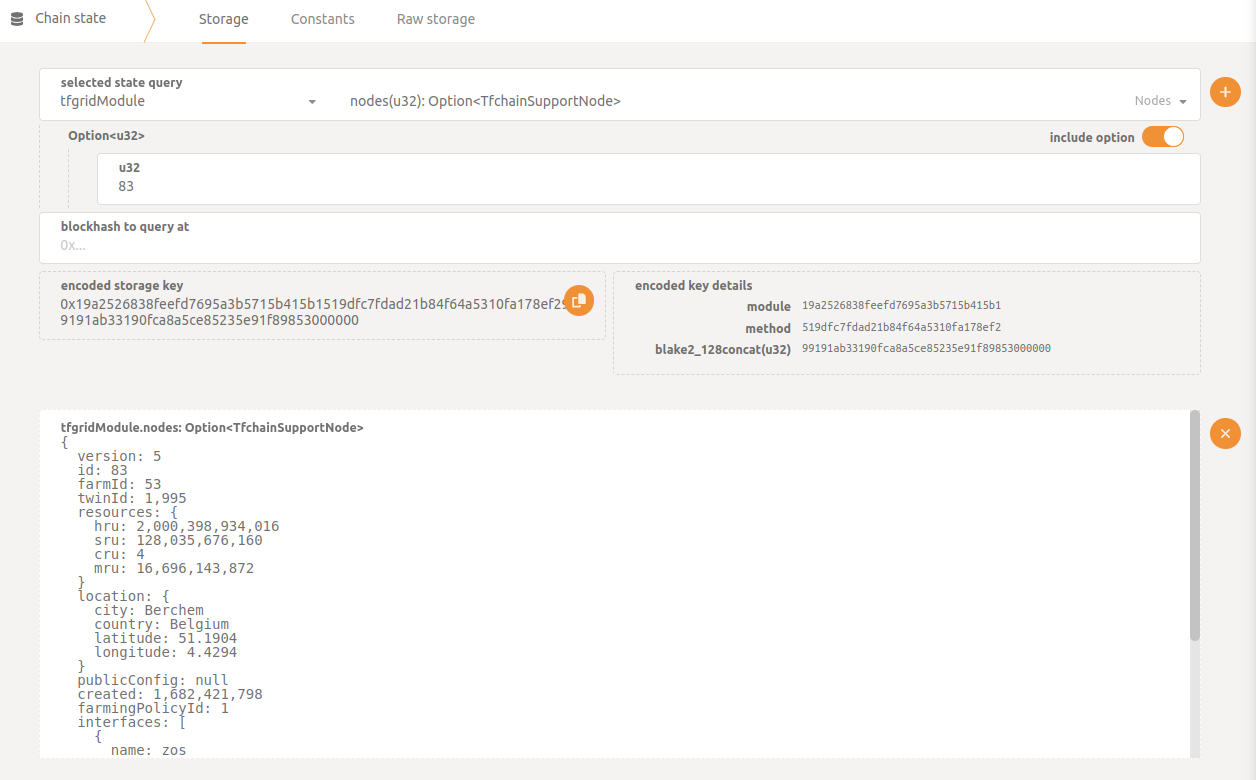
- On the page Chain State of the polakdot UI, select
For our example, these are the resources for node 83 that will be used for the calculations.
CRU = 4
SRU = 119.24
HRU = 1863
MRU = 15.55
Calculating the CU
Let's calculate the CU of this deployment.
For our example, the CU value is 10 mUSD/h. Make sure that this value is updated according to the current values.
CU = min( max(MRU/4, CRU/2), max(MRU/8, CRU), max(MRU/2, CRU/4) )
   = min( max(15.55/4, 4/2), max(15.55/8, 4), max(15.55/2, 4/4) )
   = min( max(3.8875, 2), max(1.94375, 4), max(7.775, 1) )
   = min( 3.8875, 4, 7.775 )
   = 3.8875
CU cost/hour = CU * CU pricing
             = 3.8875 * 10 mUSD/h
             = 38.875 mUSD/h
Calculating the SU
For our example, the SU value is 5 mUSD/h. Make sure that this value is updated according to the current values.
SU = HRU/1200 + SRU/200
   = 1863/1200 + 119.24/200
   = 1.5525 + 0.5962
   = 2.1487
SU cost/hour = SU * SU pricing
             = 2.1487 * 5 mUSD/h
             = 10.7435 mUSD/h
Calculating the Billing Rate for the Contract
For our example, the current TFT value is 0.011 USD. Make sure that this value is updated according to the current values.
Contract cost/hour = CU cost/hour + SU cost/hour
                   = 38.875  mUSD/h + 10.7435 mUSD/h
                   = 49.6185 mUSD/h
                   = 0.0496185 USD/h
                   = (0.0496185 * 24 * 30)
                   = 35.72532 USD/month
                   = 3247.75636 TFT/month
Applying the Dedicated Node Discount
There's a default 50% discount for renting a node, this discount is not related to the staking discount. For more information on dedicated node discounts, please read this section.
Cost with 50% discount = 35.72532 * 0.5
                       = 17.86266 TFT/month
Applying the Staking Discount
Before assuming that the price above is the final price, check first if your twin is eligible for any of the available staking discount levels. To understand more about discount levels, please read this section.
For this example, let's assume that this twin has 18 months worth of TFTs staked, so the user will be eligible for a Gold discount level (60% discount).
Cost with 60% discount = 17.86266 * 0.4
                       = 7.145064 TFT/month
Name Contract
Let's calculate the cost of a name contract.
For our example, we use the following value from the Pricing Policy.
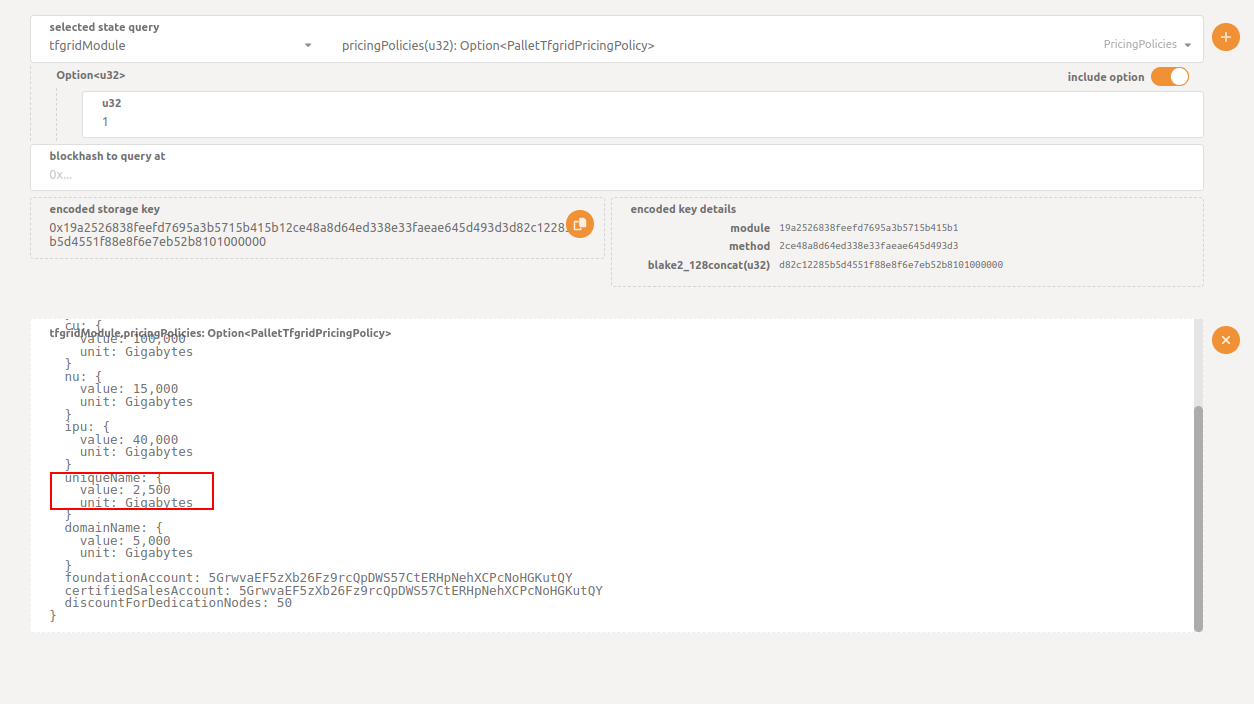
This value can then be converted to USD.
uniqueName in USD = 2500 / 10000000
                  = 0.00025 USD/hour
Since the current TFT conversion rate is 1 USD = 100 TFT, we have the following:
uniqueName in TFT = 0.00025 * 100
                  = 0.025 TFT/hour
Applying the Staking Discount
Before assuming that the price above is the final price, check first if your twin is eligible for any of the available staking discount levels. To understand more about discount levels, please read this section.
For this example, let's assume that this twin has 18 months worth of TFTs staked, so the user will be eligible for a Gold discount level (60% discount).
Cost with 60% discount = 0.025 * 0.4
                       = 0.01 TFT/hour
Public IP
Let's calculate the cost of public IPs.
For our example, we use the following value from the Pricing Policy.
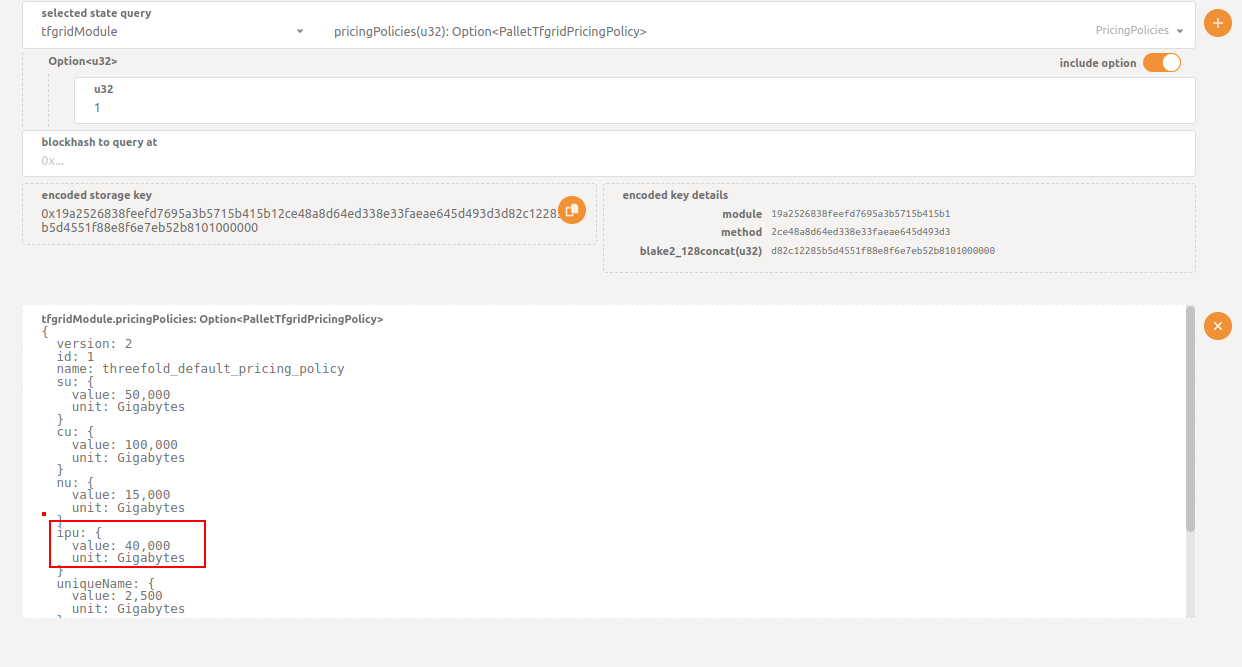
This value can then be converted to USD.
Public IP in USD = 40000 / 10000000
                  = 0.004 USD/hour
Since the current TFT conversion rate is 1 USD = 100 TFT, we have the following:
Public IP in TFT = 0.004 * 100
                  = 0.4 TFT/hour
Applying the Staking Discount
Before assuming that the price above is the final price, check first if your twin is eligible for any of the available staking discount levels. To understand more about discount levels, please read this section.
For this example, let's assume that this twin has 18 months worth of TFTs staked, so the user will be eligible for a Gold discount level (60% discount).
Cost with 60% discount = 0.4 * 0.4
                       = 0.16 TFT/hour
Note: This value gets added to the billing rate of your deployment.
Network Usage
Network Usage is calculated for deployments with public IPs. It's reported every hour and its cost can be calculated approximately as follows, where the data usage is the value of data sent and received:
network usage = data usage * NU value
Data Usage
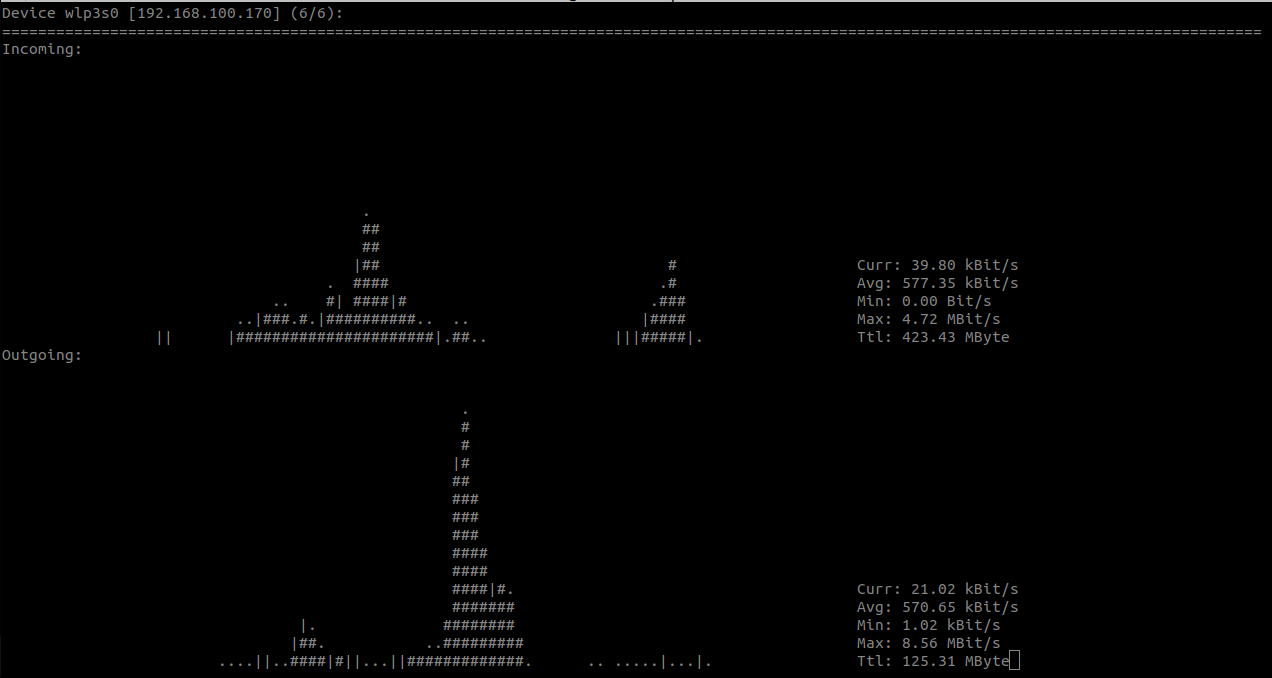
To start, let's calculate the data usage. This can be tracked with a network tool like nload, where the total amount of data sent and received can be displayed.
NU Value
Let's find the NU value of this deployment.
For our example, we use the following value from the Pricing Policy.
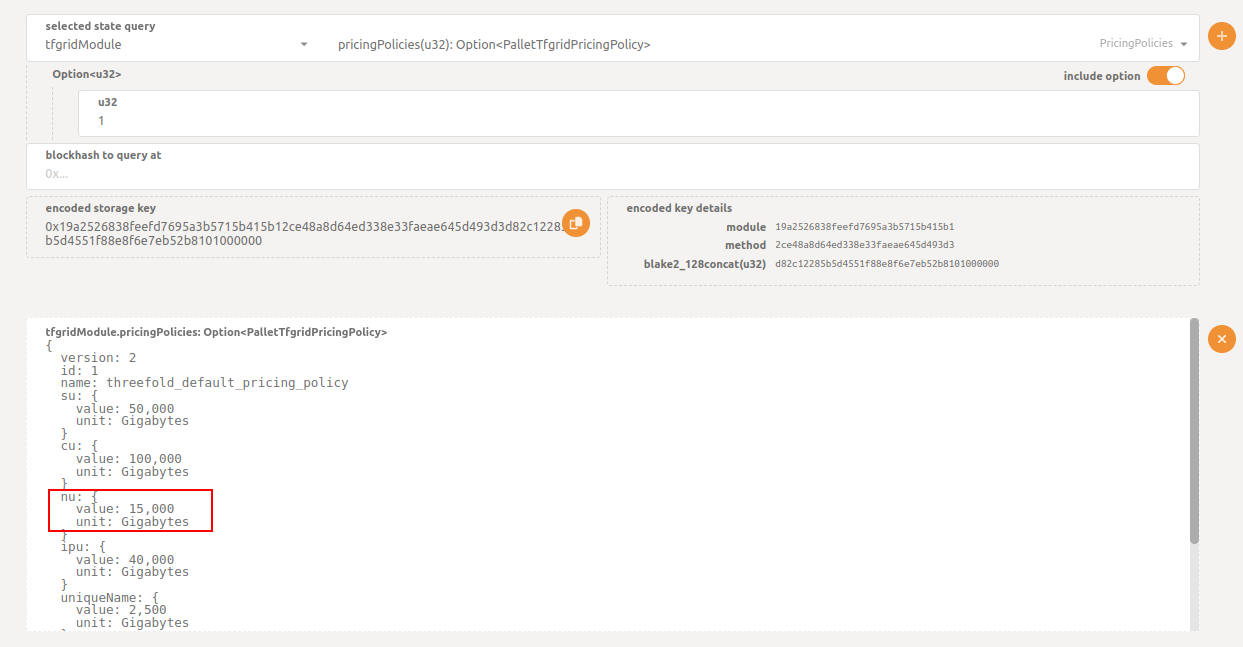
This value can then be converted to USD.
NU price in USD = 15000 / 10000000
                  = 0.0015 USD/hour
Since in our example the current TFT conversion rate is 1 USD = 100 TFT, we have the following:
NU price in TFT = 0.0015 * 100
                  = 0.15 TFT/hour
Applying the Staking Discount
Before assuming that the price above is the final price, check first if your twin is eligible for any of the available staking discount levels. To understand more about discount levels, please read this section.
For this example, let's assume that this twin has 18 months worth of TFTs staked, so the user will be eligible for a Gold discount level (60% discount).
Cost with 60% discount = 0.15 * 0.4
                       = 0.06 TFT/hour
As an example, let's assume that we used a total of 10GB in the last hour, so the next hour the billing rate should be updated to:
Total network usage = 10GB * 0.06 TFT/hour
                    = 0.6 TFT/hour
The billing rate in the next hour should be the following:
hourly billing rate = actual cost of the deployment + total network usage
Note: The calculated value will always be an approximation since it's not possible to manually calculate the exact value of the data used.
Billing History
Since the billing rate gets updated hourly, you can check the billing history from GraphQL using the following query. Make sure to enter the proper contract ID.
query MyQuery {
  contractBillReports(where: {contractID_eq: ""}) {
    contractID
    amountBilled
    discountReceived
    timestamp
  }
}